This article contains affiliate links. We may earn a commission at no extra cost to you if you make a purchase through our links.
Why Mechanical Keyboards Matter at Any Price
A quality mechanical keyboard under $100 isn’t a compromise anymore—it’s a practical sweet spot. You’re not paying for a brand name or RGB overkill; you’re getting a tool that lasts years, feels good to type on, and won’t break your budget. In 2026, the budget keyboard space is legitimately competitive. Manufacturers have figured out how to deliver satisfying switch feel, decent build quality, and useful features like wireless connectivity or programmability without charging flagship prices.
We tested keyboards across different switch types (linear, tactile, clicky), sizes, and connectivity options to find the ones that deliver real value. Our selection criteria: actual keystroke quality, build durability, typing experience for both work and gaming, and whether the price reflects what you get. Every keyboard here costs less than $100 but none of them feel cheap.
The 7 Best Options
1. Keychron Q1 Pro
The Q1 Pro sits at the premium end of the budget range but justifies it immediately. This 75% layout packs a full-size keystroke distance in a compact frame—ideal if you use arrow keys regularly but want something smaller than a full board. The aluminum case has weight to it, and the gasket mounting system actually works. Typing on it feels deliberate and controlled.
What sets it apart is the switch customization. It uses a hot-swap socket compatible with most major switch brands, so you’re not locked into Keychron’s selection. The wireless connectivity pairs reliably via Bluetooth, and the 2.4GHz dongle option gives you gaming-grade response time. Battery life stretches to 180 hours on a full charge. The programmable per-key RGB is useful if you want it, ignorable if you don’t.
The keycaps that come with it are PBT, which means they won’t get that greasy sheen over time. The stabilizers are factory-tuned and don’t rattle. These details add up—this keyboard feels like someone actually cared about assembly.
Pros:
- Gasket mounting reduces key ping and improves typing feel noticeably
- Full aluminum case holds up under daily abuse
- Dual connectivity (Bluetooth + 2.4GHz) with sub-1ms latency on wireless
- Hot-swap sockets for future switch upgrades
- PBT keycaps resist shine and degradation
Cons:
- At $99, it’s right at the ceiling of the budget category
- Stabilizers are good but not stabilizer-bar-popping-out good if you want deep customization
Verdict: Best overall for people who want a compact board that doesn’t sacrifice typing quality.
2. Nuphy Air75

This 75% wireless board was built for people who move between devices constantly. The pairing mechanism is instant—switch between your phone, tablet, and laptop without re-pairing. The build is predictable Nuphy: solid, not flashy, but completely reliable. The key spacing is standard, so muscle memory transfers cleanly from other keyboards.
The typing experience is genuinely smooth. The stock switches (option for different types) have a consistent feel across the board, and the stabilizers came tuned out of the box. Macro keys sit to the left without getting in the way. Battery life hits 200+ hours, and the USB-C charging is standard now, not a selling point.
The case material is plastic, which is the honest tradeoff for the price. It doesn’t feel flimsy—there’s no flex when you type—but it won’t have the heft of an aluminum board. The RGB is subtle and customizable. The gasket strips give the keyboard a slightly softer response compared to harder mounts.
Pros:
- Multi-device switching is genuinely seamless—no re-pairing required
- Exceptional battery life even with wireless and RGB
- Pre-tuned stabilizers eliminate the rattle some budget keyboards have
- Standard key spacing means no learning curve
Cons:
- Plastic case feels less durable than metal over five years
- Non-hot-swap switches lock you into the stock typing feel
Verdict: Best for people who type across multiple devices and need a wireless board that just works.
3. Royal Kludge RK87
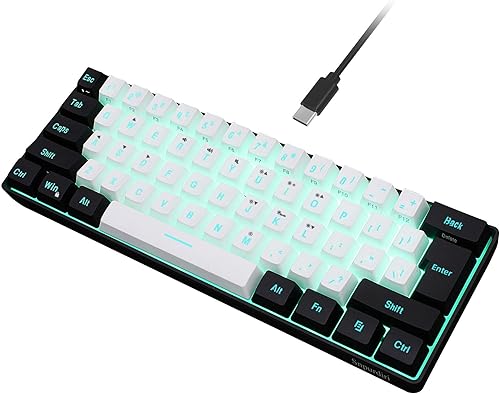
The RK87 is a 87-key board that compresses a full layout into a smaller footprint. Everything is there—function row, arrow keys, numpad cluster—but it takes up maybe 20% less space than a standard full-size. If you’re working at a cramped desk but still need those arrow keys, this is the right move.
The wireless connectivity is solid, the construction is sturdy without being overbuilt, and the typing feel is neutral. It doesn’t have strong opinions—it’s a straightforward mechanical keyboard that does the job without distractions. The programmability is there if you need custom layers. The switches are hot-swappable, giving you upgrade flexibility later.
The stabilizers are adequate but not exceptional. There’s a slight rattle if you deliberately shake the board, though you won’t notice it during normal typing. The keycaps are ABS plastic, which will develop a shine with heavy use over time. The case bottom doesn’t have a padded feet, so it sits flat but can slide on glass desks.
Pros:
- Excellent space efficiency—full function without a huge footprint
- Hot-swappable switches for future upgrades
- Dual wireless modes (2.4GHz and Bluetooth 5.0)
- Programmable macro keys
Cons:
- Stabilizers have noticeable rattle on spacebar and other long keys
- ABS keycaps will develop shine within 6-12 months of daily use
- Minimal gasket support—feels stiffer than boards with proper gasket strips
Verdict: Best for compact workspaces where you need a full layout without the full desk footprint.
4. Akko 3068B Plus
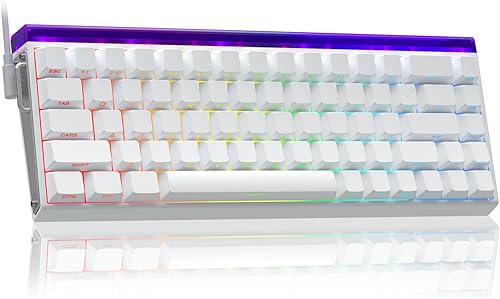
Akko builds keyboards for efficiency, and it shows. The 68% layout gives you arrow keys and a dedicated delete key while staying compact. This is an underrated size—small enough for a laptop bag, large enough that you’re not constantly reaching for function layers. The typing experience is smooth, and the acoustics are tuned toward a muted, professional sound rather than the clacky ping of cheaper boards.
The stabilizers are genuinely good at this price point. Minimal rattle, consistent feel across the spacebar, and they’re coated in a friction-reducing lubricant that actually works. The gasket mounting system is properly implemented—you’ll feel the difference immediately if you’ve used cheaper keyboards. The case is plastic but has significant weight, meaning it absorbs vibration instead of amplifying it.
The switches are pre-installed and not hot-swappable, which locks your typing feel to whatever comes in the box. Akko’s switches are reliable, but there’s no upgrade path without desoldering. The keycaps are PBT with dyesub legends that won’t fade. The wireless range is solid indoors.
Pros:
- Gasket mounting system properly reduces typing fatigue
- Stabilizers pre-tuned and stable across the board
- 65g actuation force balances responsiveness with accidental presses
- PBT keycaps with clear, durable legends
- Compact enough to travel with, large enough for daily work
Cons:
- Non-hot-swap sockets mean you can’t upgrade switches without desoldering
- Plastic case, though it’s weighted appropriately for the price
Verdict: Best for people who want a finished keyboard they can use immediately without modification.
5. Epomaker Shadow

The Shadow is a budget keyboard that refuses to cut corners where it matters. The 65% layout hits the sweet spot between compact and functional. The build quality is surprising at this price: aluminum frame with proper stabilizer bar, gasket mounting, and even a PC stabilizer plate (not the cheaper nylon option). Someone actually engineered this instead of just assembling parts.
The typing feel is responsive but controlled. The switches break in quickly—the first week feels a bit stiff, then settles into a smooth, consistent keypress. The stabilizers are pre-lubed and the rattle is minimal. The keycaps are standard ABS, which is the honest tradeoff at this price, but they’re printed cleanly and the legends won’t flake immediately.
Battery life is acceptable but not exceptional—you’ll charge every 10-14 days with moderate use. The wireless connection is reliable but occasionally drops when switching between devices. The RGB is a nice touch but feels almost unnecessary given the focus on core typing experience.
Pros:
- Aluminum frame at this price is genuinely rare
- Gasket mounting with proper stabilizer bar assembly
- Smooth stabilizers that won’t rattle during heavy typing
- Responsive switches with minimal pre-travel
Cons:
- ABS keycaps will shine with heavy use
- Battery life is shorter than some competing boards at this price
- Wireless range drops if you’re more than 8 meters away
Verdict: Best value for people who want a well-engineered keyboard without paying for features they won’t use.
6. Monsgeek M1

The M1 is a full-size keyboard that respects desk space better than it has any right to. The layout is compressed slightly—the numpad sits tighter, the spacing is efficient—but nothing feels cramped. The typing experience is warm and slightly bouncy, thanks to the dual-layer PCB and gasket strips on all sides. It’s the most tactile feel on this list without actually being a tactile switch.
The stabilizers are factory-lubed and sound good, the keycaps are PBT and will age well, and the build overall feels intentional. The programmability is deep if you want it, completely ignorable if you don’t. Wireless connectivity pairs quickly and holds strong. The case has a slight angle built in, which reduces wrist strain over an eight-hour day more than you’d expect.
The main compromise: it’s plastic. The case is well-made plastic, but it will eventually develop cosmetic wear. The weight is respectable but nowhere near an aluminum board. If you’re rough on equipment, the durability will wear faster than a metal frame. The RGB is bright and useful for finding keys in low light, but it’s not optional—you can’t turn it off completely.
Pros:
- Full layout without the oversized footprint of traditional full-size boards
- Dual-layer PCB with gasket strips delivers warm, bouncy typing feel
- Pre-lubed stabilizers with zero rattle on spacebar
- Angled case naturally reduces wrist strain
- PBT keycaps with clean legends
Cons:
- Plastic case will show wear over time with daily use
- RGB can’t be completely disabled—always uses some battery power
Verdict: Best for people who need a full keyboard layout but want a smaller, ergonomic footprint.
7. Lemokey L3

The L3 is a modular keyboard that lets you swap between 75%, 65%, and 60% layouts with different PCBs. This is conceptually appealing—one case, multiple configurations. In practice, the modularity adds slight complexity, but it works. The construction is solid throughout: aluminum case, gasket mounting, properly tuned stabilizers. The typing experience is consistent across all configurations, which is harder to achieve than it sounds.
The standout feature is the macro customization. The software is intuitive, and the per-key programming actually sticks after power cycling. The wireless connection is fast and reliable. The keycaps that ship with it are clean and won’t wear quickly. The case sits slightly angled, reducing fatigue during long typing sessions.
The modularity is also the main con. It adds cost compared to a single-layout board, and the flexibility doesn’t matter if you’ve settled on one size. The stabilizers, while good, need stabilizer bar modifications if you want deep tuning. The keyboard ships with the 75% PCB, so you’ll need to buy additional PCBs ($30-50) if you want to use the other sizes.
Pros:
- Swappable PCBs let you experiment with different layouts
- Aluminum case with proper weight distribution
- Gasket mounting with tuned stabilizers
- Macro customization software is intuitive and reliable
- Wireless range extends to 10 meters indoors
Cons:
- Additional PCBs cost extra ($30-50 each) to unlock the modular benefit
- Modularity adds complexity—single-layout keyboards are simpler to maintain
Verdict: Best for people who want to experiment with different layouts without buying multiple keyboards.
Final Recommendation
If you’re buying your first mechanical keyboard at this price, grab the Keychron Q1 Pro or the Nuphy Air75 depending on whether you value layout optimization or multi-device switching. If you’re upgrading and want the best typing feel per dollar, the Epomaker Shadow or Akko 3068B Plus are the honest picks. The rest are solid alternatives for specific use cases. Every board on this list will still feel good two years from now.
Related Articles
- 7 Best Smart Home Devices for Practical Home Automation in 2026
- 7 Best Noise-Canceling Headphones for 2026: The Definitive Rankings
You might also like: 7 Best Smartwatches for 2026: Budget vs Premium Compared